

WhatsApp Business Portfolio: What It Is and How to Set It Up Right
Nobody sets out to learn what a WhatsApp Business portfolio is. You run into it. You are trying to get a number live on the WhatsApp API, some Meta screen tells you to select or create a business portfolio, and the whole thing stops while you go and find out what that means and whether you already have one.
I have set up and untangled enough of these to know the portfolio is where the early mistakes hide. Not the dramatic kind. The quiet kind. A name typed slightly differently, a number that was already on WhatsApp, the wrong person holding the account. They surface two weeks later as a verification that will not go through or a sending limit that will not climb, and by then you have forgotten the thirty seconds when you caused it.
So before you build anything on top of it, here is what the portfolio actually is, what it decides for you, and where people lose time.
What a WhatsApp Business Portfolio Is, Minus the Jargon
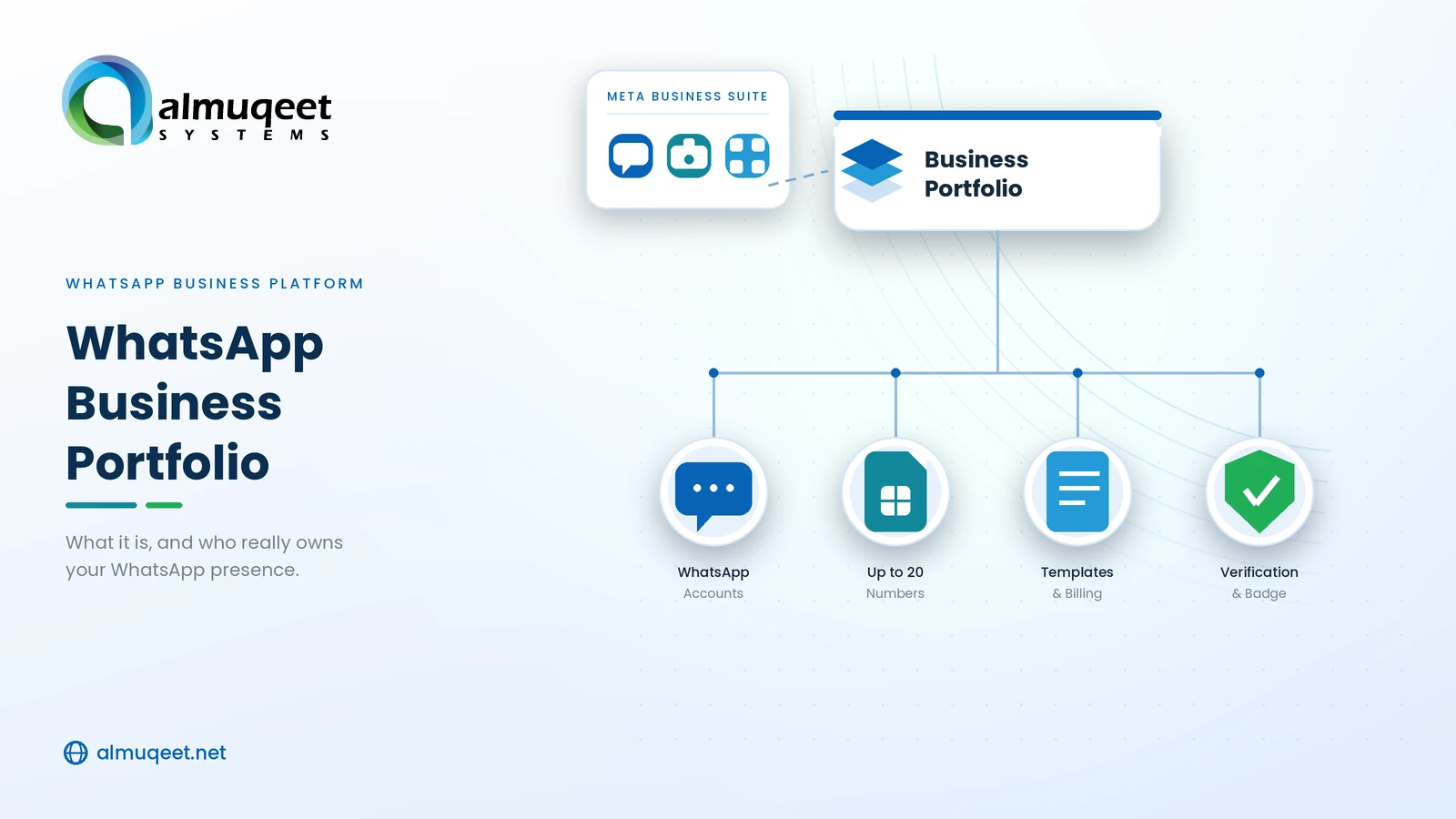
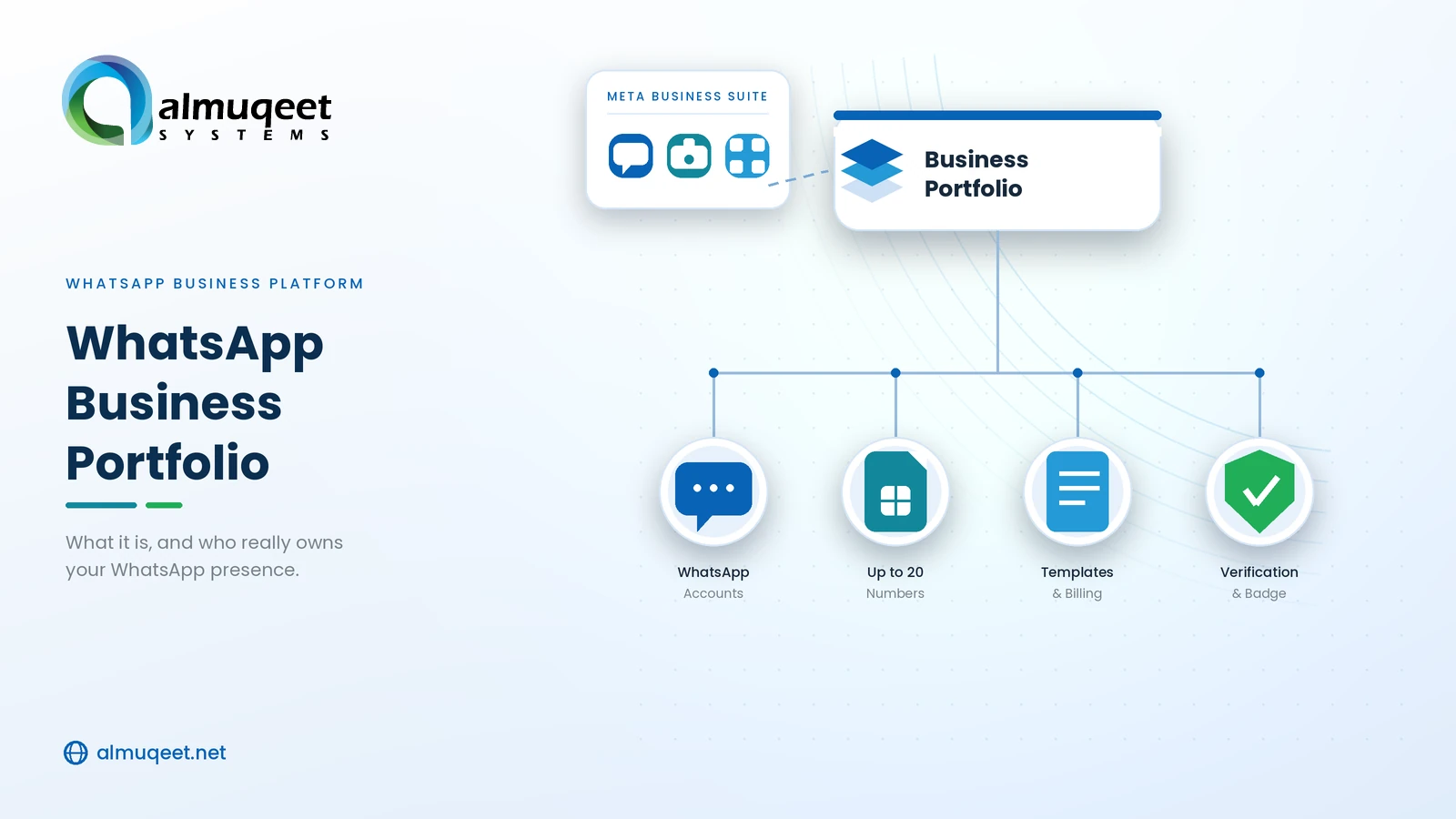
Strip it back, and a WhatsApp Business portfolio is the account at the very top of your WhatsApp setup, the one everything else reports to. Your WhatsApp Business Account sits under it. Your numbers sit under that. Verification, business ID, billing, all of it hangs off this single parent account.
The one job it does, really, is this. The portfolio is how Meta knows the whole stack belongs to your business and not to the person who happened to click the buttons. Which sounds like pure paperwork, right up until the person who clicked the buttons leaves the company and takes the access with them.
Why the WhatsApp Business Portfolio Goes by Three Names
Part of why this is confusing before you even start is that the thing has three names and you will meet all of them.
You searched for "WhatsApp Business portfolio." Meta's own screens say "Meta Business Portfolio." Older articles, and there are a lot of them, say "Business Manager," because that is what Meta called it before. One container, three labels, and nobody updated the internet in sync.
There is no WhatsApp-only version tucked away somewhere. It is a single Meta Business Portfolio with your WhatsApp account living inside it, and "WhatsApp Business portfolio" is just the phrase people reach for when they are thinking about the WhatsApp part of it.
The name that actually is a separate thing, and the one people mix up most, is WhatsApp Manager. That is the control panel where you handle numbers and templates and check your quality score. It lives inside the portfolio. If a guide tells you to do something in your portfolio and you are staring at WhatsApp Manager, unable to find the option, that mismatch is usually the reason.
What You Find Inside the Portfolio
Here is what the portfolio is holding once it exists.
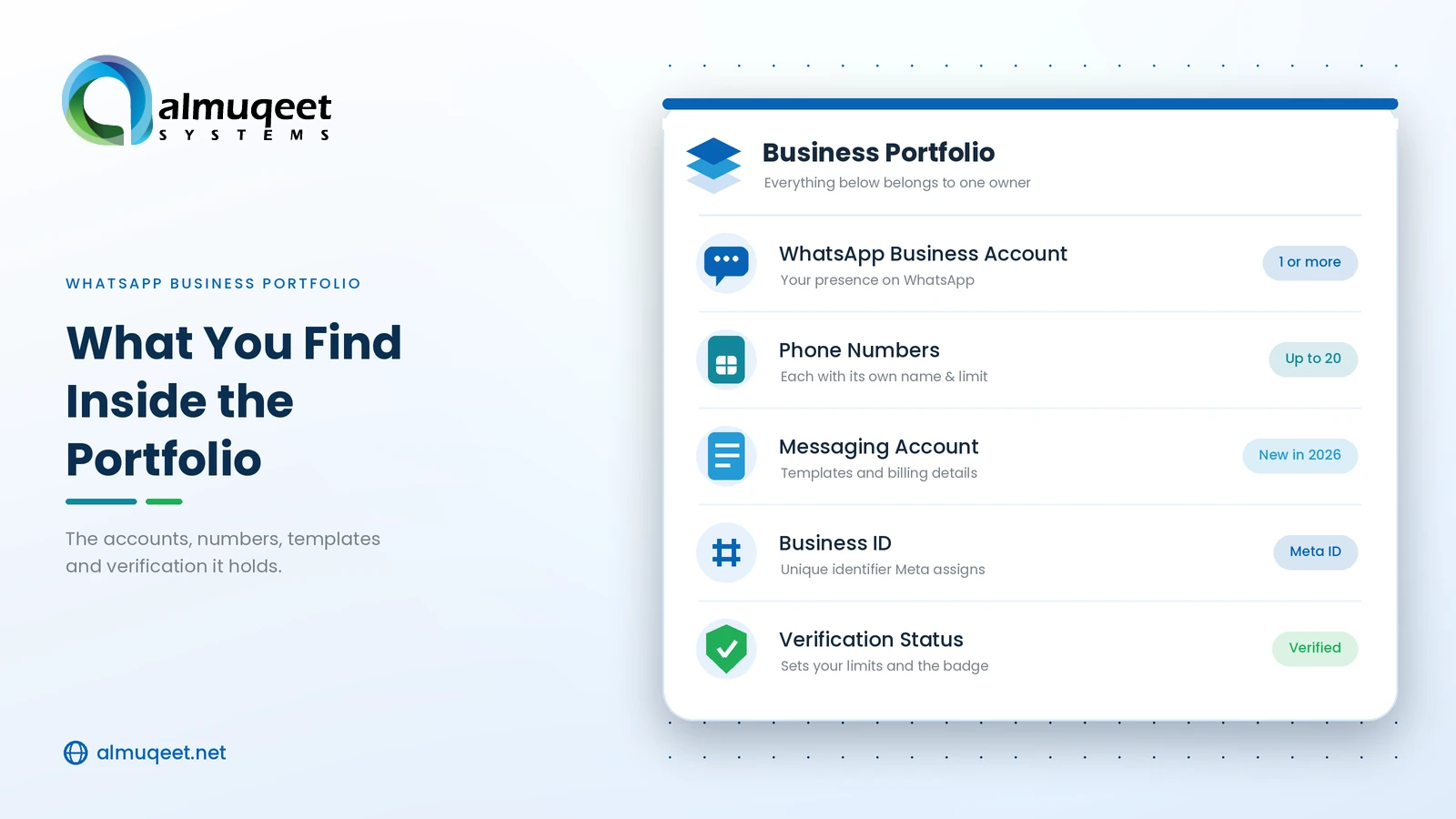
Your WhatsApp Business Account, or more than one if you want them. Plenty of businesses keep sales on one account and support on another, both under the same portfolio, and that is fine.
Up to twenty phone numbers. Each one carries its own display name, its own quality score, and its own sending limit, even though they share the portfolio.
A business ID, which is just a long number Meta stamps on the portfolio. You get asked for it during setup and any time you contact support, so it helps to know it exists before someone wants it.
And your verification status, which quietly runs everything else and gets its own section in a moment.
One detail worth flagging, because most older write-ups predate it. Meta pulled what used to be a single WhatsApp account into two pieces: one that carries the phone number, and a separate messaging account that carries your templates and your billing. The portfolio sits over both. So if you came in expecting one tidy account and the billing and templates look like they are described on their own, that split is why, and your old account ID still points where it should.
Nothing Sends Until the Portfolio Exists
You cannot file this under later. No portfolio means no registered number, no approved template, no message, nothing. Meta wants somewhere to put your business before it lets you near its users, and the portfolio is that somewhere. There is no side door around it.
It is also keeping score the whole time. Your daily reach, the count of people you can message, is tracked across the entire portfolio and not per number. Your template allowance depends on whether the portfolio is verified. So this is not a container you set once and ignore. It is the thing deciding how much Meta will let you do, and it moves based on how you behave.
Verify the Portfolio Early or Pay for It Later
If you do one thing here properly, verify the business. Most other things are recoverable. This one sets your ceiling.
Unverified, you are boxed in. A few hundred templates per messaging account, low throughput, no trust badge. Verify the business and get a display name approved, and that ceiling lifts hard, into the thousands on templates and far higher on reach.
Unverified portfolio | Verified portfolio | |
Templates per messaging account | A few hundred | Up to several thousand |
Messaging throughput | Starts low, climbs slowly | Climbs faster, higher ceiling |
Official Business Account badge | Not available | Eligible |
Meta adjusts the exact numbers, so read the table as the shape rather than a promise. The gap between the columns is the whole point, and it is wide enough that doing verification on day one instead of day ninety is one of the easier good calls you get to make.
It is also what gets you the green tick, the Official Business Account badge. For a bank, a lender, a retailer, anyone whose customers need to trust them before tapping a link, that badge is not decoration, and it begins at the portfolio.
What Actually Goes Wrong When People Set Up a Portfolio
The setup itself is nothing. Log in, create a portfolio, type your business name, address, and website, confirm the email Meta sends. Fifteen minutes, if that.
Where the fortnight actually goes is the details, and it is nearly always the same short list.
The biggest one is small inconsistencies. Meta cross-checks the name and address on your portfolio against the documents you upload and against your website, and it is fussy about it in a way that feels petty until it has bounced you twice. "Acme Retail Pvt Ltd" on the registration and "Acme Retail" on the portfolio is enough to stall the whole thing. Make all three match exactly, punctuation included.
Then the website. Meta wants a real one, on your own domain, with the legal business name showing on it somewhere, usually the footer. A social page or a coming-soon placeholder does not clear it, and people lose days before they believe that.
The number catches people constantly. Whatever number you connect cannot already be living on the regular WhatsApp app or the Business app. If it is, you delete that account first or use a clean number, and a fair few setups stall right here with someone convinced the registration is broken when the number is simply taken by them, on their own phone.
And the one that turns into slow grinding pain months later is a duplicate portfolio. If a colleague already made one for the business a year ago and forgot, do not make a second. Two portfolios for one business is an ownership tangle that is genuinely tedious to undo. Check before you create anything.
If you are onboarding through a provider, which is how most businesses do it, they walk you past most of this. If you are the provider running the onboarding, the order of operations is different, and the steps to become a WhatsApp Tech Provider lay that out.
Do You Need One WhatsApp Business Portfolio or More
One. For almost everyone, the answer is one, and I would push back on anyone reaching for more without a reason they can say out loud.
A single portfolio holds a lot. Several WhatsApp accounts, up to twenty numbers, separate accounts for separate arms of the business, all under one roof. That covers the big majority of companies I come across.
You split into separate portfolios only when something forces it. Two genuinely separate legal entities. A franchise where each location keeps its own documents and verification. Real structural separation, not "it feels neater." And it gets heavier than it looks, since one person can only create two portfolios before you are dragging in extra admins.
There is one practical reason to split that is easy to miss. The messaging limit is shared across the whole portfolio, so all your numbers drink from the same daily pool. For most businesses, that never matters. If you are running two large sending operations that should not be eating each other's allowance, that is a fair argument for keeping them apart.
Whose Name the Portfolio Should Be Under
The business owns the portfolio. Two admins at least, both people you trust, and under no circumstances parked on one employee's personal Facebook account.
I keep hammering this because it is the mistake with the longest tail. The portfolio is the asset. Whoever holds it holds your numbers, your templates, and your ability to reach your own customers. I have watched a company get locked out of its own WhatsApp presence because the only admin was a freelancer who moved on, and clawing it back was weeks of tickets and documents. Do not be that company.
Bringing in an agency or a provider does not mean handing over the keys. You keep the portfolio, and you share the specific pieces they need through Meta's partner sharing, nothing beyond that. The old arrangement where a provider held everything on your behalf has been retired by Meta, and that change is in your favour because you stay the owner of the thing. If you want to understand how a provider or a reseller actually relates to your accounts before you sign with one, the gap between a Solution Partner and a Tech Provider is the piece to read.
The Portfolio Is Not the Whole Stack
The portfolio is the base for WhatsApp, and only WhatsApp, which is worth keeping in mind before you treat it as your whole messaging plan.
WhatsApp is good at conversation, the rich back-and-forth. It is not your best tool for blunt, fast, one-way delivery, where A2P SMS still beats OTT messaging on raw reach and speed, and on Android a lot of WhatsApp's richness is being closed in on by RCS business messaging anyway. Almost nobody who starts on WhatsApp stays WhatsApp-only for long.
So the portfolio usually ends up as one part of a bigger setup rather than the thing itself. Run WhatsApp as a channel behind a CPaaS platform, sitting next to SMS and voice, and you avoid wiring the same plumbing three times over. And because every country you message into runs its own consent rules, the global SMS compliance side is worth sorting before you push a WhatsApp programme across borders. The portfolio gets you sending. Sending legally everywhere is a separate problem.
Where Almuqeet Comes In
Meta hands you the portfolio and the rulebook. It does not hand you the API connection, the onboarding, or a provider who sets things up so you keep ownership instead of quietly signing it away.
That is the gap Almuqeet works in, as a WhatsApp Business Platform provider running the API and the Tech Provider side of onboarding. Your portfolio stays yours, verified under your business, with Almuqeet added as the partner and not the landlord, and the WhatsApp account and Messaging account brought up correctly the first time around rather than the third. Still weighing how providers differ? The Business Solution Partner versus Tech Provider breakdown is where I would start.
Where I Would Start
If this were my setup, I would spend the first hour on the dull stuff and nothing else. Business name identical across the portfolio, the website, and the documents. Legal name on the site. A phone number that is genuinely free. A second admin from inside the business on the account. That is the whole list, and it is the difference between a portfolio that clears in a few days and one that keeps bouncing for a month.
The portfolio is the least interesting thing about running WhatsApp. It is also the thing that sets your ceiling, so it is the one place where boring and careful actually pays you back.
If the real project is running WhatsApp alongside SMS and voice without standing up separate infrastructure for each channel, that is the part Almuqeet handles. Get the portfolio solid first. The rest is the next conversation.
WhatsApp Business Portfolio: Questions I Get a Lot
What is a WhatsApp Business portfolio?
The top-level Meta account that holds your WhatsApp Business Account, your numbers, your business verification, and your business ID. Meta's own name for it is Meta Business Portfolio, and you need one to use the WhatsApp Business Platform.
Is a WhatsApp Business portfolio the same as a Meta Business Portfolio?
Yes. Meta calls it a Meta Business Portfolio. People say WhatsApp Business portfolio when they mean the WhatsApp side of it. It is also the thing that used to be called Business Manager. Three names, one account.
Do I actually need one to use the WhatsApp API?
Yes, no exceptions. Nothing registers, gets approved, or sends without a portfolio for Meta to attach it to.
How many numbers fit in one portfolio?
Up to twenty, spread across one or more WhatsApp accounts under that portfolio.
Is verification really worth it?
Early, yes. It lifts your template allowance and sending limits a long way and gets you the Official Business Account badge. Skip it, and you hit low ceilings fast.
Can I have more than one?
You can, and one person can create two, but most businesses only need one. Keep them separate only for distinct legal entities or operations that should not share a sending limit.
Who should own it?
The business, with at least two admins. Never a single employee's personal account. Share access with providers rather than handing over ownership.
Share this post